Showing posts with label Best Practices. Show all posts
0

Best Practices For Coding (Re-Usability)

Posted by Danielle Smith on 14:10 in
Good afternoon everyone!

Today marks the finale of my mini series of blog posts on the best practices for coding. If you haven't done so already, I strongly recommend that you read my previous blog posts to catch up, which can be found here:

Best Practices For Coding (Intro)
Best Practices For Coding (Readability)
Best Practices For Coding (Accessibility)

What is meant by "Code Re-Usability"?

Code re-usability means that certain parts of the code has been written in such a generic way that it can be reused in multiple places within your application. As the term goes, why reinvent the wheel if you have a perfectly good subroutine or function available for your use just waiting for you to plug some variables into it? Repeating code unnecessarily can:

  1. Take up memory usage unnecessarily.
  2. Take additional time to copy, paste and incorporate into the new function.
Code re-usability is key, particularly when it comes to creating larger and more complicated programs. Why start off complicated as when solutions expand, it only becomes more and more complicated. Plan ahead, look at possible scenarios where code may need to be repeated (such as for delete or save commands) and then code appropriately.

What has to be noted is that SQL Server isn't as flexible with code re-usability compared to other programming languages such as C++ and C#. When you think of code re-usability in SQL, you will probably think of using the following:

  • Stored Procedures that can cope with many different tables and inputs.
  • One very large re-usable view which brings back rows from a variety of different tables and joins them all together.
  • User Defined Functions that can be executed by many different queries.
Whilst these are all methods of code re-usability, they also have one other thing in common; a relatively negative impact on performance, especially when many instances are used.

So how would you get around this problem? 


  • Stored Procedures can be used but try not to make them too generic, otherwise it'll slow things down instead of speed them up. 
  • Use views but don't overcomplicate them unnecessarily. 
  • In-line code and logic has much better performance than User Defined Fucntions, so try to use it as much as you possibly can.

The key really is all about balance, and weighing up the pros and the cons sensibly. You need to consider the project scale as if you have multiple users who could be possibly accessing the same data at the same time (which is the most likely scenario), you will definitely want to make performance your priority.

Conclusion

Overall, you could argue that SQL could do more in order to promote code re-usability, however realistically this probably would never happen. In the mean time, you just have to be careful when using Stored Procedures, Views and User Defined Functions as yes, they do reduce the chances of you repeating yourself but they can come at a performance cost!

This is the conclusion to my mini series on the best Practices For Coding. I hope you have found the blogs in this series useful.

What's Next...

Thank you for reading today's blog post! If you have any questions/comments/feedback, please leave them in the comments section below and I will get back to you as soon as I can. Alternatively, please like my SQL Genius Facebook Page and leave a message on there. Thanks! :)

0

Best Practices For Coding (Accessibility)

Posted by Danielle Smith on 14:02 in
Good afternoon everyone!

Today I will be continuing on with my mini series of blog posts on the best practices for coding. If you haven't done so already, I strongly recommend that you read the blog posts already written in this series, which can be found below:

Best Practices For Coding (Intro)
Best Practices For Coding (Readability)

What is meant by "Code Accessibility"?

Code accessibility means that all parts of the code solution are accessible on execution, even if there is only a remote chance of that particular part of code being run. The idea is to remove any "unreachable code" (or preferably plan ahead and avoid it altogether to begin with!) as it:

  1. Takes up memory usage unnecessarily.
  2. Causes unnecessary caching as the code would never be run. 
  3. It takes up database time and effort to maintain even though it will never be run. 
Generally, I haven't seen much of this in my current work place as we are good at planning ahead and designing our functions before we start coding. We never code completely blindly as this is where problems start to occur.

It's also important to track changes in your application, so if functionality is modified it may make some parts of existing code redundant. If this is the case, don't leave it in there active just comment the lines out. This way, the code will not take up any additional memory or caching, plus if you need to go back and re-implement the code you can do so with very little difficulty.

Example of Bad Code Accessibility

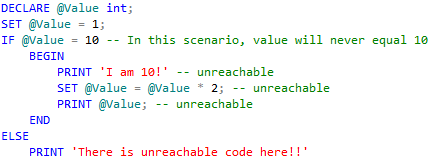
Below is an example of code that has poor accessibility (as the condition will never be met providing the code remains the same as it is):


Note that if there is a condition that could possibly be met (though it is very unlikely to be met but there is a chance it could be), this is not an example of unreachable code. If it is physically impossible for execution to reach a particular part of code and therefore leaving it completely redundant, that is unreachable code and a demonstration of poor code accessibility. As a developer, you want to produce code that not only works, but performs well.

In SQL, occasionally error messages pop up saying that there is unreachable code. However, this shouldn't be relied on completely as I have noticed on occasions where SQL Server tells me that the command has been completed successfully, when actually it didn't even do anything! Be warned and make sure you read your code thoroughly so you can follow it through.

Conclusion

As a conclusion, I hope you have seen the importance of code accessibility and the impact it can have on the performance of your code (and queries). Obviously, your code will still work without being completely optimized, however why leave redundant code that will never be used? Along with maximising your code's readability, your queries, stored procedures, functions and subroutines will look and perform much better.

What's Next...

Stay tuned for tomorrow as I will be discussing code re-usability, something which should always be at the back of a developers mind when they are programming anything as you don't want to waste time and effort on an overcomplicated solution when they can reuse subroutines and functions that have already been written previously! This post will be the last within this mini series so don't miss out.

Thank you for reading today's blog post! If you have any questions/comments/feedback, please leave them in the comments section below and I will get back to you as soon as I can. Alternatively, please like my SQL Genius Facebook Page and leave a message on there. Thanks! :)

0

Best Practices For Coding (Readability)

Posted by Danielle Smith on 11:46 in
Good morning everyone! Hope you all had a great weekend!

Today marks the start of my mini series of blog posts on the best practices for coding. If you haven't done so already, I strongly recommend that you read my blog post on Friday, which can be found here:

Best Practices For Coding (Intro)

What is meant by "Code Readability"?

Code readability basically means how easy it is to read the code that's in front of you and understand what it is supposed to be doing at a glance without having to do too much digging around and investigating. Code readability is good for multiple reasons:

  1. It proves that you, as the developer who wrote the code, understand what has been written and why it accomplishes the job that it does.
  2. It helps other developers who may need to view or expand on your code in the future.
  3. It helps you determine whether you have used the best programming practices to ensure you have found the best solution for the job. 
During my time in the work place, I have seen just how easy it is to slip into bad habits, which get picked up at the peer review stage and have to be rectified before a second round of peer review is conducted, which can waste time as the initial developer should be thinking of readability in the offset! The purpose of this blog post is to highlight how to make your code more "beautiful" so it is easier to be read and reused by other developers.

Examples of Bad Code Readability

Below is an example of code that has poor readability:


Examples of Good Code Readability

Below is an example of code that has good readability:


See the difference?  The top example has no comments, no indentation, a variable name called "a" with no explanation via comment what "a" actually is and variable declarations are sometimes in capitals and sometimes in lower case. Personally, I find that quite difficult to follow. The second example however is much better as it has been indented and commented properly, plus a consistent naming theme has been put into use. And these are both the same function that perform exactly the same functionality, just laid out differently. Isn't it interesting how different they look from each other?

Tips On How To Make Your Code "Beautiful"

Personally, I prefer looking at code that's "beautiful" as it's easier to read, digest and learn from. I use the following guidelines to help me make my code more readable:

Sensible Commenting

Commenting code really helps others understand your program. Not only that but what if you take a break from a project and come back to it at a later date? What you may have understood at the time may be confusing to you now as you cannot remember what certain functions may do, and it may not look obvious by looking at the code alone.  Ensure that you do make comments to your code to make it easier to understand.

However, some developers take this very “literally” and comment every single line of code, even if it is pointless and it is very obvious what the line of code does. This is not necessary and can actually cause more hindrance. There is really no need to go overkill, it will just mean you will have to trail through lots of comments in order to find the what you are looking for, which is time consuming and very avoidable.

Consistent Indentation

Code naturally forms an indenting structure. The purpose of this is to make it easier to see where functions, loops, if statements etc. begin and end. Most IDEs (Integrated Development Environments) have their own way of correcting indenting format so that it is consistent throughout the source file, making the life of the developer much easier. However in SQL, this isn't the case and there is no control. As a rule of thumb, I always tab in code if it is:

  • Between a BEGIN...END statement.
  • Within an IF statement.
  • Nested. 

It really doesn't matter too much with SQL code, providing you use a consistent indentation theme, then you'll be fine. 

Consistent Variable Names

So you've named your tables, views and columns using camelCaps. Really, you should be using the same practice in your T-SQL code variables as well as this improves your consistency. Again, ensure that you stick to just one (sensible) naming convention and preferably use the convention you have used to name your tables. As a reminder, the 2 common practices are:

  • camelCaps (or camelCase): The first letter of each word is capitalised, except the first word.
  • under_scores: Words are separated by underscores.

Use The Right Control Flow Statements

As mentioned in my previous blog post series about transactional flow, certain control flow statements such as BEGIN...END and IF...ELSE actually aid code readability as it is easy to follow the flow of the code. However, using statements such as GOTO can cause problems and make it harder for you to read, particularly if you use a lot of them. Always keep code readability in mind when selecting the right statements to use!

Code line lengths and wrapping

Not only is it difficult to read when the line of code scrolls off the page, but if a developer is viewing the code on a relatively small screen/small screen resolution, they will have a nightmare attempting to follow the code through. Also, if you wish to print your code it will become more difficult if it overlaps horizontally on A4.

Although this is a matter of preference dependant on the developer, 80 characters is the traditional length and most programmers adhere to this standard. Consistency is key! Make sure that all of your source files and query files have the same code line length.

Capitalisation of keywords

It may also be a good idea to capitalise any SQL keywords as it will make it easier to distinguish them from a block of code, particularly if it forms part of a long source file or query.

Conclusion

As a conclusion, I hope you have seen the importance of code readability and the impact it can have on your code. Obviously, it will still work without it but why not go that extra mile and show that you not only can make code that works, you can make elegant code that works!

What's Next...

Stay tuned for tomorrow as I will be discussing code accessibility, something which should always be at the back of a developers mind when they are programming anything as you don't want to waste time and effort on an overcomplicated solution!

Thank you for reading today's blog post! If you have any questions/comments/feedback, please leave them in the comments section below and I will get back to you as soon as I can. Alternatively, please like my SQL Genius Facebook Page and leave a message on there. Thanks! :)

0

Best Practices For Coding (Intro)

Posted by Danielle Smith on 12:46 in
I have mentioned previously in past blog posts how important it is to ensure that the names of your tables, views and columns are well thought out and consistent. However, if you are creating transactional statements or using any form of programmable code at all, it is also important to follow guidelines in order to improve the code’s readability, accessibility and re-usability. With SQL – you can get away without doing this but why would you? You’re just making things harder for yourself if another developer has to look at and potentially expand on your code yet they can’t work out what it’s supposed to be doing!

The idea of this blog post is to simply provide an introduction or taster to my next series of blog posts highlighting the best practices for SQL coding (or at least – ones which I have researched in the past and adhered to that appear to work very well).

So when reviewing your code, make sure you ask yourself the following:

Code Readability

  • How easy it is to read the code and follow it through? 
  • Can you tell what the code is doing at a glance? 
  • Does the code look neat?

What makes SQL so different to other programming languages is that you can’t press a button and it will automatically indent everything to make it look wonderful like you can in Visual Studio (Ctrl K+D). There is no standard layout.

Code Accessibility

  • Is all code accessible at execution time?
  • Are there any instances where you know that a part of your code will be skipped and will never be executed?

Code that you can’t even access is a complete no-no as it wastes time and effort to implement.

Code Re-Usability

  • Is code concise with no repetition? 
  • Have you used functions and referred back to them as and when they're needed?

Why would you want to rewrite an entire transaction when you have already got the exact same one referenced in another function on the same database instance?!

As a junior, it's ok to think of these questions after you have coded something before it goes to peer review (after all, providing it works in the first place that's a good thing right? That's the first hurdle jumped). However as you gain more experience, you begin to foresee things more often and you should have those questions in the back of your mind as you're coding. This will make your solutions much more reliable.

Next week I am going to really hone in on what makes your programming code successful and as usable as possible, starting with code readability best practices. Stay tuned for that!

As A Final Word... 

Thank you for reading today's blog post! If you have any questions/comments/feedback, please leave them in the comments section below and I will get back to you as soon as I can. Alternatively, please like my SQL Genius Facebook Page and leave a message on there. Thanks! :)
Happy Friday everyone – hope you all have a great weekend!

0

Tips on How To (Correctly!) Define Your Tables

Posted by Danielle Smith on 14:34 in
Having a good understanding of how to CREATE, INSERT, UPDATE and DELETE from tables (and views have been covered too) is obviously a massive benefit to your learning curve. However, now that the "basics" have been covered, it's time to fine tune our knowledge and learn more about how to make our databases and objects more intuitive.

Naming Conventions

Naming your views, tables, columns, objects etc. with sensible (and practical) naming conventions is vital, otherwise you may end up alienating your users and losing true clarity on what is stored within your view/table/column/object. To avoid this situation, ensure that you choose one sensible naming convention and then stick to it throughout. There are two common practices:

  • Upper CamelCaps (or Upper CamelCase): Where the first letter of each word is capitalised. In pure coding cases, you usually only use standard camelCaps where the first letter of each word is capitalised except the first word. 
  • Under_scores: Where words are separated using underscores. 

It's also a good idea to use prefixes before your Views, Functions and Stored Procedures as they become easier to find and subsequently use when writing T-SQL.

Examples are:

  • fn_ - Function
  • sp_ - Stored Procedure
  • vw_ - View 

We tend to not use prefixes on table names any more as it can become clunky as the majority of your database objects will be tables. It's purely to aid the developer and helping to distinguish between all database objects in the system.

Choosing Your Data Types 


Now, it's time to tackle data types and more specifically, choosing the right one for the job.

Below are 5 simple tips for choosing the correct data types that I try to follow myself when designing either a new database or new tables within an existing database:
  1. Always use a data type that takes less space to store yet still performs the task that you want it to.
  2. Make sure you plan ahead! Think of future application needs when designing your database and once you have added a data type to a column, try not to change it to a different type as it can be difficult to re-reference (though there may be some situations where you will have to change the type - again keep this in mind). 
  3. In the majority of cases, use variable-length data types as they adapt to fix the size of their contents. A perfect example would be to use nvarchar instead of nchar.
  4. Use fixed-length data types if the contents of a column changes regularly as the cost of re-allocating and de-allocating space far outweighs the cost of recommending a larger amount of space to begin with.
  5. Consider the practices of the database in pre-existing tables and follow their example. This will make things less confusing. For example, if the database uses GUIDs as unique identifiers instead of auto-incrementing integers, try to stick to using GUIDs. 
Below is a link to Microsoft's site, listing database types that are available in SQL Server. Use this wisely to help you choose the best data type for your situation.

http://msdn.microsoft.com/en-us/library/aa258271(v=sql.80).aspx 

NULL or NOT NULL?


When deciding whether a column should be NULL or NOT NULL, make your decision carefully, especially in the case of allowing null values to begin with and then modifying the column to NOT NULL. If NULLs have been entered into the system and then the field becomes not nullable, it means that those database records would now have data missing and SQL Server will kick out an error message stating that the type cannot be changed. It's better practice to start with using NOT NULL in the beginning and then switching later if you have to. 

What you should also consider is that allowing NULLs will allow gaps in the database and it can make it confusing when trying to query the database. 

Plus, NULL is what it is... null. 0, unknown, N/A, none and -1 are all values and do not mean the same thing as NULL so beware! (particularly when using aggregates as this can mess with your result set!) 


0

GUIDs vs. Integers – Which is best to use as a unique identifier?

Posted by Danielle Smith on 12:10 in
Many people typically use auto incrementing integers as a way of creating a unique identifier for a record for many different reasons. However, you can also use globally unique identifiers as well. So which one shall I use?? Take a look at the list of advantages and disadvantages of each below to help you make your decision:

Advantages of Auto Incrementing Integers 

  • The storage size in order to store an auto incrementing integer is only 4 bytes, meaning that you will be able to store vast amounts of data without the integer value being a problem. 
  • Fewer IO operations are required to store and retrieve an integer value rather than a GUID. 
  • Integers can be incremented by any value and can be started from any value. E.g. usually it can start at 1 and increment in 1’s. You can decide to start it at 10 and then increment in 2’s for example. 
  • You can tell, roughly, when the data was entered into the database as it usually occurs in chronological order. 

Disadvantages of Auto Incrementing Integers

  • However, primary keys using integer values can cause conflicts when merging multiple databases as there may be duplicates. 

Advantages of GUIDs

  • Because GUIDs are so unique (and random) it allows you to merge records from different tables and databases much easier with no duplicates. 
  • Subtle errors when passing unique identifiers between tables can be prevented as GUIDs only occur once, unlike incrementing integers that can appear on multiple occasions throughout your database. 
  • Useful from a security perspective, so if someone tries to enter through the back end of a system by editing the URL and for some reason, the security is not as tight as it should be, it would be virtually impossible for someone to guess a correct GUID in comparison to an incrementing integer that would go up by a set number each time. 

Disadvantages of GUIDs

  • However GUIDs take up 4 times the amount of space as an integer number (16 bytes) which may not seem like much but when you are talking about large amounts of data with millions of rows, it can be considered a massive waste of space on both your disk and the SQL Server’s RAM as well in order to access and retrieve these from the database. 
  • GUIDs reduce the performance and speed of your database when joining tables together in comparison to auto incrementing integers. 
  • GUIDs are not easy on the eye, both from the developers’ point of view and the customers’. Displaying a GUID to a customer on an invoice, for example, would be pointless. 
  • GUIDs cause fragmentation within your indices in the database, and thus affecting all round performance and speed of the database. Therefore they are not suitable for clustered keys and it would be much better to use INT IDENTITY () instead. 

Conclusion

GUIDs are very useful on smaller systems and for merging data from different tables or databases together. However they could potentially decrease the performance of your database on larger systems, and therefore impacting on the speed of your application.

Ultimately, the decision is down to the developer on what they prefer to use in various different circumstances.

Copyright © 2009 SQL Genius - Personal Development of a Junior All rights reserved. Theme by Laptop Geek. | Bloggerized by FalconHive.