0
Searched Case Statements in SQL
Posted by Danielle Smith
on
16:04
in
CASE
Good afternoon everyone! Hope you're all well.
Today's quick blog post is about searched CASE statements, which allows comparison operators to be used. This means that instead of using only equivalent values, the case can search between values. Boolean expressions can also be used so you can determine whether a flag has been switched on or off.
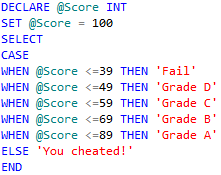
This example declares a variable called "Score" and gives it a value. The CASE statement will then work out whether the value is found within the range of the case. If it does, then a message would be displayed to the user. If not, then the next comparison will take place. This continues, much like within a Simple CASE statement, until either a solution has been found or until the transaction returns what has been included in the "ELSE" statement.

This CASE statement example determines whether a value stored within a variable is either Odd or Even. Note that you don't just need to use OR within a Boolean expression CASE statement, you can also use AND, BETWEEN, IN, ALL, ANY, EXISTS, LIKE, NOT and SOME.
Thanks for reading today's blog post! If you have any questions/comments/feedback, please leave them in the comments section below and I will get back to you as soon as I can. Alternatively, please like my SQL Genius Facebook Page and leave a message on there. Many Thanks!

Today's quick blog post is about searched CASE statements, which allows comparison operators to be used. This means that instead of using only equivalent values, the case can search between values. Boolean expressions can also be used so you can determine whether a flag has been switched on or off.
Searched CASE statement using comparison operators
An example of a searched CASE statement using comparison operators is as follows:This example declares a variable called "Score" and gives it a value. The CASE statement will then work out whether the value is found within the range of the case. If it does, then a message would be displayed to the user. If not, then the next comparison will take place. This continues, much like within a Simple CASE statement, until either a solution has been found or until the transaction returns what has been included in the "ELSE" statement.
Searched CASE statement using Boolean expressions
An example of a searched CASE statement using Boolean expressions is as follows:This CASE statement example determines whether a value stored within a variable is either Odd or Even. Note that you don't just need to use OR within a Boolean expression CASE statement, you can also use AND, BETWEEN, IN, ALL, ANY, EXISTS, LIKE, NOT and SOME.
What Next...
Tomorrow, I will be writing about IF... ELSE statements, which will be the first of my transaction flow blog posts. Stay tuned!Thanks for reading today's blog post! If you have any questions/comments/feedback, please leave them in the comments section below and I will get back to you as soon as I can. Alternatively, please like my SQL Genius Facebook Page and leave a message on there. Many Thanks!


